DLSS 5 Apply Paths Today (Sep 2026): Official, Swapper 2.2.7, Manager 1.3.3, Pre-SR
Evergreen how-to as of 28 Sep 2026: Official / Swapper 2.2.7 / Manager 1.3.3 / OptiScaler Pre-SR — decision table, steps, community apply screenshots (not NVIDIA promo pairs).

TL;DR — As of 28 Sep 2026 (KST), apply DLSS 5 Neural Rendering in this order: (1) Official NVIDIA toggle when the game ships it (e.g. NBA 2K27 on RTX 50 + current Game Ready driver). (2) One community manager — prefer DLSS 5 Swapper v2.2.7 or DLSS 5 Manager 1.3.3, never both on the same game. (3) Manual OptiScaler DLSS-NR / Pre-SR fork only when you need pipeline control (RunBeforeSR / multipass) and accept experimental IQ + anti-cheat risk. Community tools are not NVIDIA products. Skip competitive / anti-cheat titles; always keep a restore path.
What is new in this piece (vs already-published Terapep posts)
| Already on Terapep | This draft’s angle |
|---|---|
| Swapper how-to (centered on v2.2.1) | Decision guide: which path to use today; Swapper notes updated to v2.2.7 (multipass route, community page, driver ask) |
| Manager / FMKorea (1.2.0 era) | Manager bumped to 1.3.3 (Live Flow, anti-cheat indicator, Korean UI, Pre-SR-style overlay options) — not a FMKorea poten reprint |
| OptiScaler Pre-SR explainer (pipeline / FPS science) | How to apply steps + when Pre-SR is the right next move after a one-click install |
| RTX 40 official status · 5090 power | Cross-links only — no duplicate support or watts deep-dive |
Bottom line: this is an evergreen “apply paths compared” howto for 2026-09-28, not another Swapper-only or Pre-SR-performance rewrite.
Primary links (as of draft date)
| Path | What | Link |
|---|---|---|
| Official | NVIDIA GeForce News — DLSS 5 / NBA 2K27 | nvidia.com/…/dlss-5-3d-guided-neural-rendering |
| Swapper | rakanki911/DLSS5-Swapper v2.2.7 (12 Sep 2026) |
github.com/rakanki911/DLSS5-Swapper/releases |
| Swapper guide | Install / restore overview | dlss5swapper.org/guides |
| Manager | NODIX-TECH/DLSS-5-MANAGER 1.3.3 (25 Sep 2026) |
github.com/NODIX-TECH/DLSS-5-MANAGER/releases |
| OptiScaler NR | Dagherbou OptiScaler_DLSSNR v0.2.0 line |
dlss5swapper.org/optiscaler-dlss-5 (points at GitHub; not Swapper itself) |
| Pre-SR fork | wilsjo2/OptiScaler-DLSSNR-PreSR-Multipass (+ ShyVortex lineage) |
github.com/wilsjo2/OptiScaler-DLSSNR-PreSR-Multipass |
| Community FPS | Reddit report amplified by press (u/Sad-Victory-8319) | r/nvidia — “DLSS5 placed before the upscaling step…” |
| Press roundup | Wccftech Pre-SR write-up (9 Sep 2026) | wccftech.com/dlss-5-performance-cost-cut-in-half-with-experimental-optiscaler-mod |
Korean boards (FMKorea / Etoland-style posts) still push Manager or Swapper as beginner one-clicks; several advise Swapper portable + Korean UI and warn not to install Manager and Swapper together. Treat those as community UX tips, not NVIDIA docs.
Community apply screenshots (primary art)
Primary visuals are community tool / in-game captures — Swapper UI, Manager UI, RenoDX/OptiScaler overlays, and user FPS shots — not NVIDIA GeForce News AEM promo pairs (Zorah / ramen chef / NBA 2K27). NVIDIA GeForce News AEM promo pairs (Zorah / ramen chef / NBA 2K27) are not used as primary art here.
FMKorea poten (Manager one-click)
The desktop WAF blocked curl; these are live board screenshots of the FMKorea poten post, captured in Sep 2026 for its Manager one-click guide. User nickname and avatar regions are privacy-blurred; ad chrome was cropped from these local previews while the title, permalink, GitHub, Manager, and game UI remain readable. The FMKorea hero is not required here; the current Pre-SR hero remains in use.
Open the FMKorea poten board capture — full-thread screenshot (ads cropped, nick blurred) was prepared locally for this draft; host CDN pending. Title: “DLSS5 존나 쉽게 적용하는 방법”.
Post title “DLSS5 존나 쉽게 적용하는 방법,” privacy-blurred author row, permalink chip, and first embedded in-game screenshot. Source: FMKorea poten post
The post’s NODIX-TECH/DLSS-5-MANAGER GitHub repository step and project file view. Source: FMKorea poten post

Manager release page and download assets, including the checked .exe release. Source: FMKorea poten post

DLSS 5 Manager GAMES grid after the library scan, shown inside the FMKorea post body. Source: FMKorea poten post
Manager install dialog for a selected game, showing the executable field, install modes, and API choices. Source: FMKorea poten post

Lower Manager install/settings UI with executable paths, API selection, and the Install action. Source: FMKorea poten post
Swapper UI
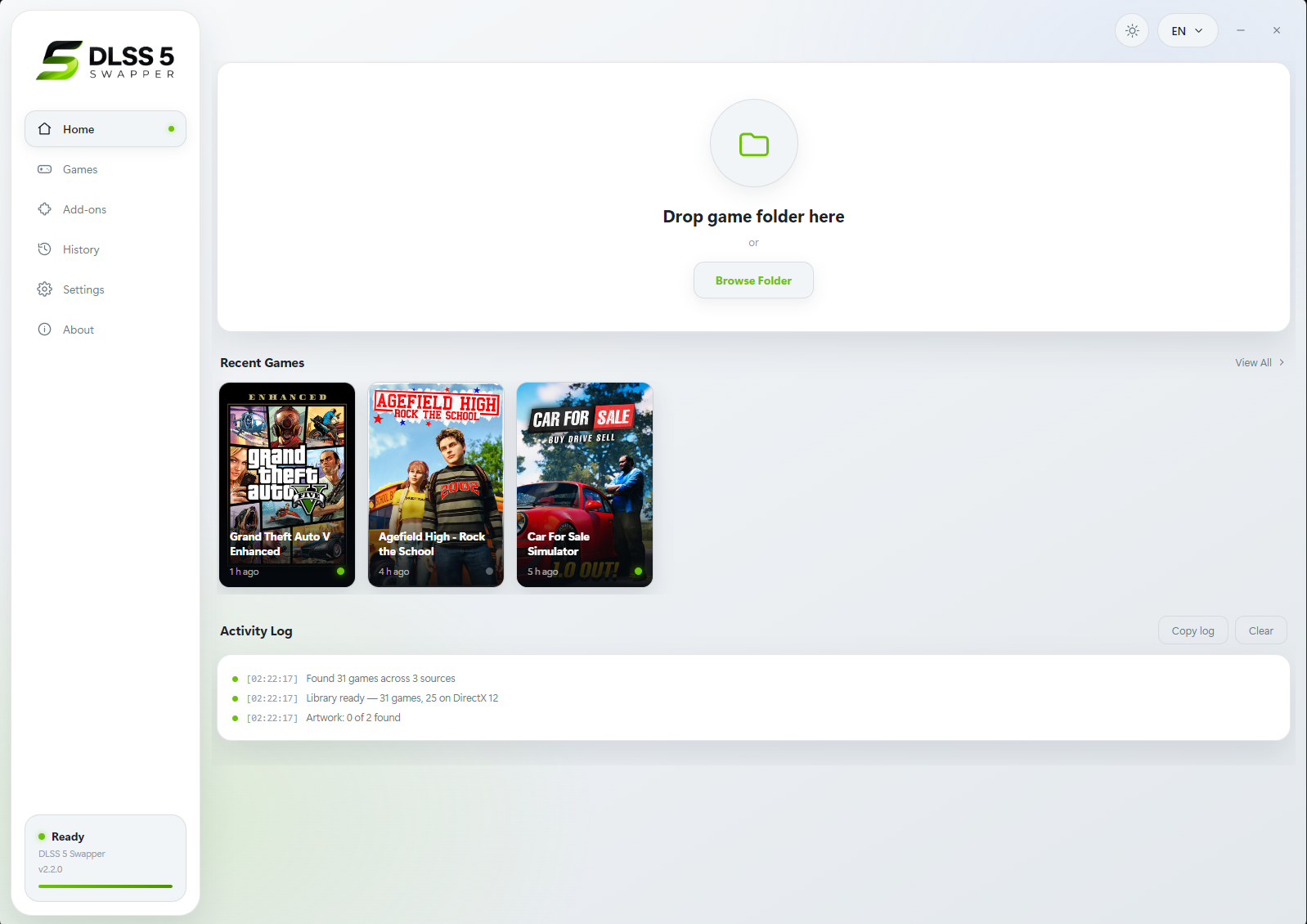
DLSS 5 Swapper Home — drop folder / recent games / activity log (project UI capture, ~v2.2.0).
Hotlink: https://raw.githubusercontent.com/rakanki911/DLSS5-Swapper/7415065e5c5437441d0e0b0a0362d0ada6d86e15/docs/screenshots/01-home.png
Source: rakanki911/DLSS5-Swapper README · docs/screenshots
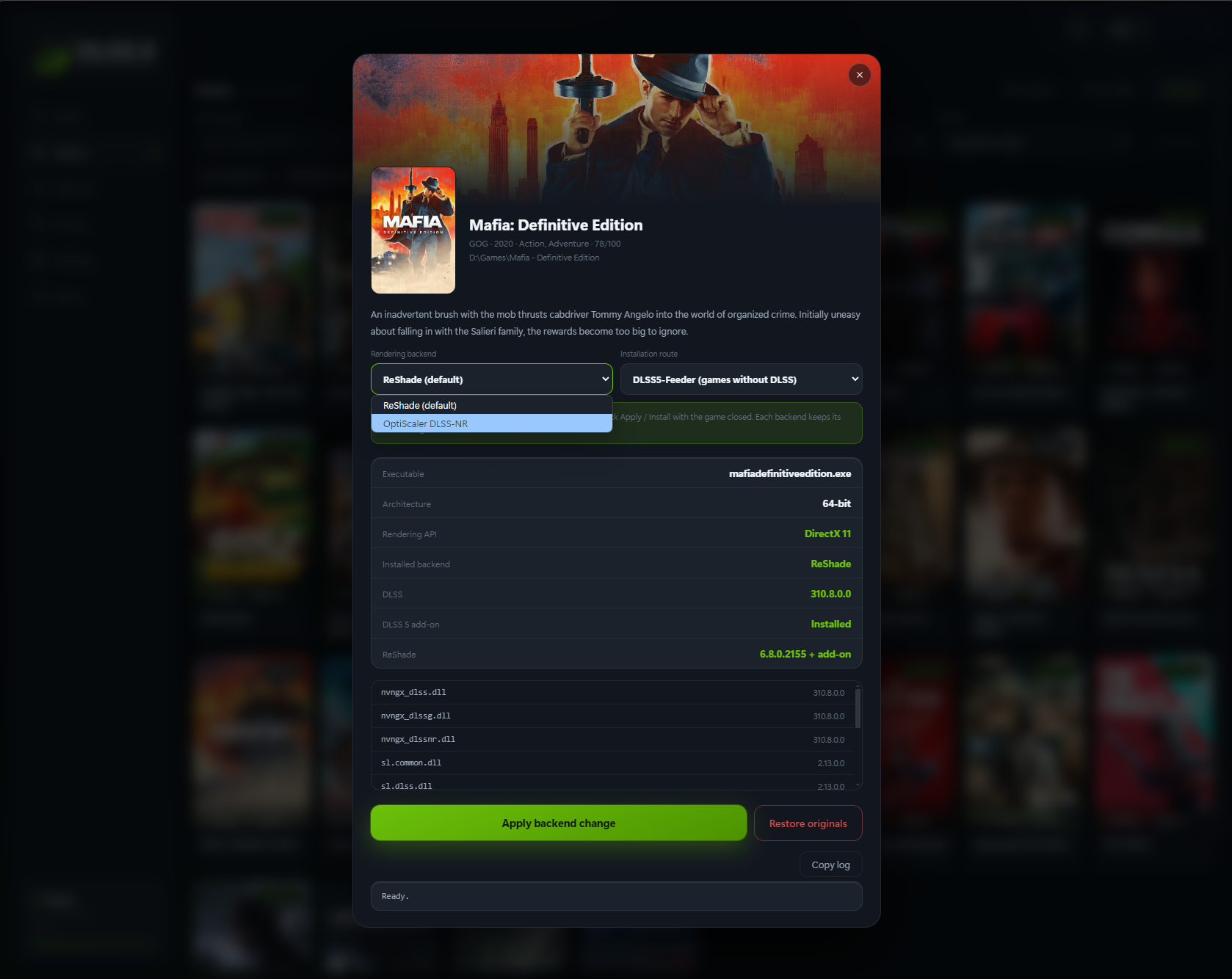
Swapper game card — Rendering backend open on OptiScaler DLSS-NR, installation route DLSS5-Feeder, DLSS 5 add-on installed; local path blurred in local draft copy.
Hotlink: https://raw.githubusercontent.com/rakanki911/DLSS5-Swapper/7415065e5c5437441d0e0b0a0362d0ada6d86e15/docs/screenshots/04-game.png
Source: same repo screenshots
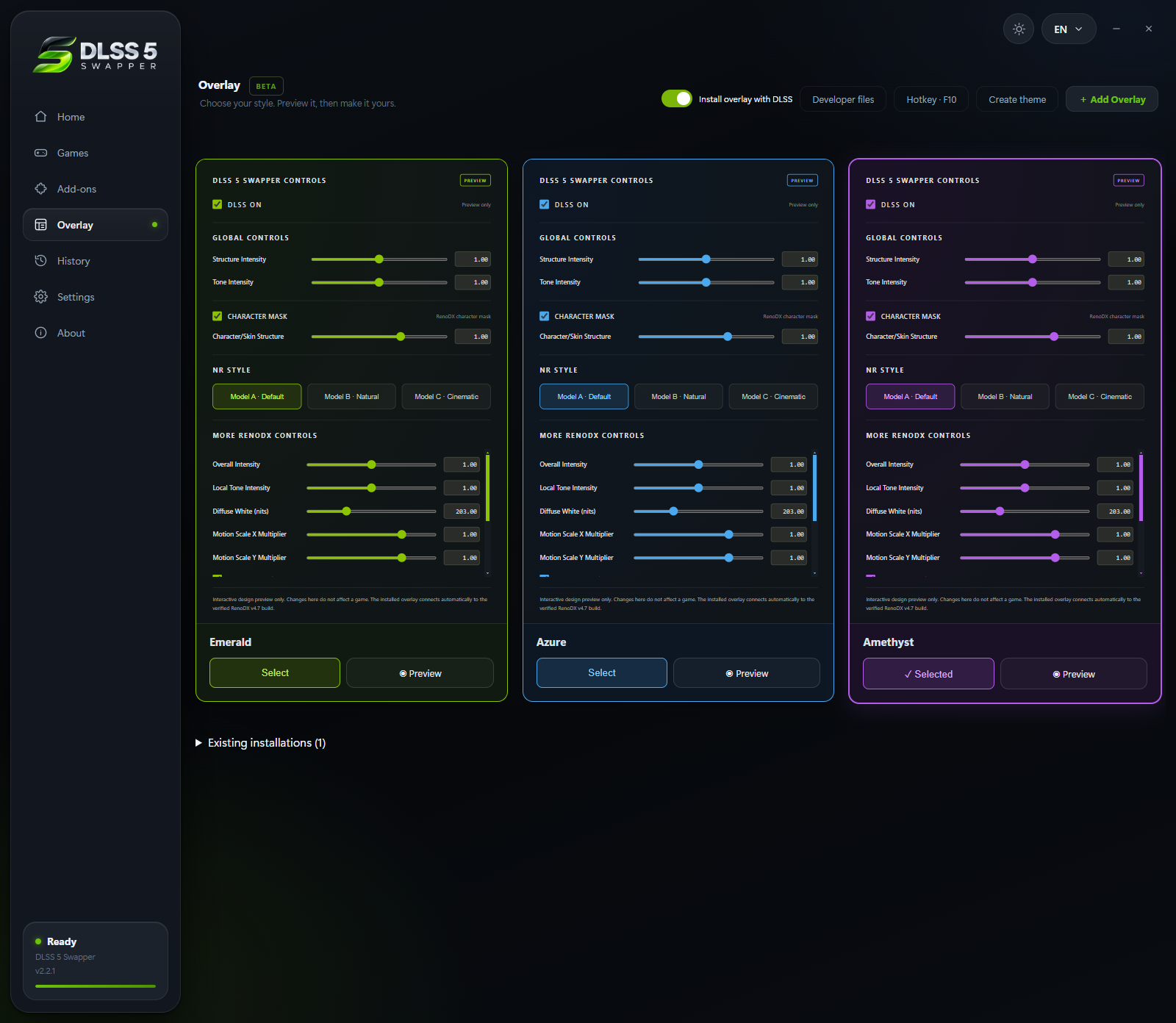
Swapper Overlay page (BETA) — Emerald / Azure / Amethyst themes previewing in-game NR sliders (Structure / Tone / Character Mask / Model A–C); F8 overlay path in product docs.
Hotlink: https://raw.githubusercontent.com/rakanki911/DLSS5-Swapper/main/docs/screenshots/07-overlay.png
Source: docs/screenshots/07-overlay.png

Manager UI + in-overlay NR
DLSS 5 Manager — Games grid after pointing at a Steam library (cover tiles; French UI in this capture).
Hotlink: https://www.univers-simu.com/wp-content/uploads/2026/09/02-detection-steam.png
Source: Univers-simu — DLSS 5 Manager guide (11–12 Sep 2026)
Manager install modal — API pills OptiScaler / DX12 / DX11 / DX9, Neural Upstream BETA off, Dynamic Overlay on (Shift+O); local .exe path blurred in draft copy.
Hotlink: https://www.univers-simu.com/wp-content/uploads/2026/09/03-install-dlss5.png
Source: same guide
Manager after install — Neural Upstream BETA toggled ON (Pre-SR-style add-on) with deploy log; local path blurred.
Hotlink: https://www.univers-simu.com/wp-content/uploads/2026/09/04-neural-on.png
Source: same guide

In-overlay RenoDX tab via Manager — DLSS-NR, Hook Method Auto, “Auto: Active, native DLSS SR/AA/RR output”; guide arrows highlight Auto / Hook Method.
Hotlink: https://www.univers-simu.com/wp-content/uploads/2026/09/05-hook-auto.png
Source: same guide
OptiScaler Pre-SR + Reddit community in-game
OptiScaler DLSS-NR Pre-SR overlay — Enable Neural Rendering + Apply before Super Resolution checked; model passes / cost controls visible. Originated as community capture; mirrored by press.
Hotlink: https://cdn.wccftech.com/wp-content/uploads/2026/09/dlss5-placed-before-the-upscaling-step-OptiScaler.webp
Source permalink: r/nvidia — “DLSS5 placed before the upscaling step…” · press mirror Wccftech 9 Sep 2026

Community full-UI / game capture with RTSS + DLSS debug overlay (user apply stack, not a GeForce News slider still).
Hotlink: https://cdn.wccftech.com/wp-content/uploads/2026/09/dlss5-placed-before-the-upscaling-step.webp
Source: same Reddit thread · Wccftech

Same community scene / stack with Pre-SR placement — the ~122 FPS datapoint discussed in the Reddit + Wccftech write-ups (community measurement, not a lab chart).
Hotlink: https://cdn.wccftech.com/wp-content/uploads/2026/09/dlss5-placed-before-the-upscaling-step-2.webp
Source: same Reddit permalink
Official NVIDIA interactive 4K sliders (if you need marketing reference only) remain on GeForce News — DLSS 5 — not used as this draft’s primary figures.
Decision table — which apply path today?
| Your situation | Prefer | Avoid |
|---|---|---|
| Title officially lists DLSS Neural Rendering (e.g. NBA 2K27 on RTX 50) | Path A — Official in-game toggle | Injecting Swapper/Manager on top “just because” |
| Single-player / offline library; want one-click + restore | Path B — Swapper 2.2.7 or Path C — Manager 1.3.3 (pick one) | Installing both tools into the same game folder |
| FPS collapses with NR after SR; you already understand OptiScaler overlays | Path D — Pre-SR OptiScaler fork (or Manager/Swapper OptiScaler route with RunBeforeSR if exposed) | Competitive multiplayer / VAC / EAC / BattlEye titles |
| You only care about watts / TGP | Read the 5090 power post — not this howto | Treating FPS recovery as a power claim |
| RTX 40 “is it official yet?” | RTX 40 status post | Assuming community DLL swaps = first-party support |
Official toggle available?
  YES → Path A (stop here if it works)
  NO  → Need one-click library tool?
          YES → Path B OR Path C (one app only)
          NO / need Pre-SR cost control → Path D (manual fork or OptiScaler route)
Path A — Official NVIDIA (verified steps)
Source: NVIDIA GeForce News, 1 Sep 2026 — NBA 2K27 debut for all GeForce RTX 50 Series (desktop/laptop) and GeForce NOW.
| Step | Action |
|---|---|
| 1 | Install a current GeForce Game Ready driver from the NVIDIA website or NVIDIA App. NVIDIA’s enablement write-up names 616.64 WHQL as the driver that reveals the in-game option. |
| 2 | In NBA 2K27, open Video Settings. |
| 3 | Turn On → DLSS Neural Rendering. |
| 4 | Set Super Resolution / Frame Generation / Reflex as you like. |
| 5 | During gameplay or replays, toggle Neural Rendering with F9. |
Confirmed (NVIDIA): Streamline / UE5 plugin integration for studios; NR is optional and independent of SR / MFG / Ray Reconstruction; artist controls (structure/tone/masking) are developer-facing — players get a simple on/off.
Unverified / do not claim here: that every future title will expose the same F9 binding, or that driver 616.64+ is ideal for community RenoDX consumers (see Path B driver note — those are different code paths).
Path B — DLSS 5 Swapper v2.2.7 (one-click library)
What changed since Terapep’s v2.2.1 Swapper post: releases 2.2.2 → 2.2.7 (Sep 2026) added broader detection, Community page/chat, Multipass (RenoDX DLSS Tool route, up to 10 passes), tray behavior, GPU-filtered community reviews, and clearer driver / antivirus messaging. Latest public tag checked for this draft: v2.2.7 (12 Sep 2026). Components noted in that release include Feeder 0.15.1, RenoDX DLSS5 v4.7, OptiScaler DLSS-NR 0.2.0-patch1 (or older pin per game), ReShade 6.8.0.
Verified install flow (from dlss5swapper.org/guides + GitHub release notes)
| Step | Action |
|---|---|
| 1 | Download only from GitHub Releases (or the project’s stated Nexus / SourceForge mirrors). Prefer installer or portable — verify SHA256 beside the assets (SHA256SUMS.txt). |
| 2 | Run the app. SmartScreen may warn (unsigned). Let it build the library (Steam / Epic / GOG / Xbox folders). Full-drive scan stays off unless you enable it. |
| 3 | Open a game card → review API / DLSS presence → choose an installation route (Native / Feeder / OptiScaler / Multipass as offered). Close the game first. |
| 4 | Install. The app backs up originals, swaps files, and installs ReShade silently when the route needs it. |
| 5 | Launch the game. ReShade route: Home → Add-ons → confirm Neural Rendering. Overlay on supported DX11/DX12 Feeder/RenoDX builds: F8 (since v2.2.1). |
| 6 | If image / launch is wrong: close game → Restore originals. |
Driver caveat (Swapper release notes — flag clearly)
Swapper’s own release text states NVIDIA driver 616.56 is the last build they measured completing a neural pass on the RenoDX / Feeder consumer path, and that 616.64 and newer can fault inside NVIDIA’s neural runtime for that path. The app warns and still lets you install. This is a community measurement, not an NVIDIA GeForce News claim — and it can conflict with Path A’s “use newest GRD” advice. Unverified for your GPU/game until you test: whether 616.56 vs newer is required.
Anti-cheat
Treat as single-player. Swapper warns on detected anti-cheat; it does not bypass it. Restore before online play.
Path C — DLSS 5 Manager 1.3.3 (FMKorea-style one-click, updated)
What changed since Terapep’s Manager 1.2.0 / FMKorea piece: tags through 1.3.3 (25 Sep 2026) add Live Flow, community messaging, Korean and other languages, overlay “auto basic settings,” anti-cheat indicator, OptiScaler key remaps, experimental MFG / multipass work in Live Flow, and dll-rename injection options. Domain mentioned by the author: dlss5manager.app. License / branding remains NODIX TECH — prefer GitHub Releases over random mirror EXEs.
Beginner steps (aligned with project README + FMKorea poten pattern; version-bumped)
| Step | Action |
|---|---|
| 1 | Download latest self-contained build from GitHub Releases (1.3.3 as of 25 Sep 2026). |
| 2 | Extract / run DLSS 5 MANAGER. Let it scan Steam / Epic / GOG / Game Pass-style libraries. |
| 3 | Select a game → Install (pick the API the game actually uses — PCGamingWiki helps when unsure). |
| 4 | Launch → open overlay (Insert in classic poten write-ups; 1.3.x lets you remap overlay / activation keys). |
| 5 | Enable Neural Rendering. If exposed, try Apply before Super Resolution (Pre-SR-style) and start with one model pass / default intensity before raising multipass or model resolution. |
| 6 | Use the app’s uninstall / restore flow before patching or going online. |
Do not stack Manager + Swapper on one title (Korean board consensus + practical DLL/ReShade conflicts).
Unverified: Live Flow “works on all apps/games,” MFG quality vs Lossless Scaling, and AMD Live Flow claims — treat as author roadmap / beta, not confirmed lab results.
Path D — Manual OptiScaler DLSS-NR / Pre-SR (newest pipeline path)
Use this when one-click NR is too expensive at 4K, or you need explicit before vs after Super Resolution control. Deep FPS science lives in the Pre-SR Terapep draft/post; below is the apply checklist only.
D1 — OptiScaler_DLSSNR (post-upscaler NR pass)
Source: project docs summarized at dlss5swapper.org/optiscaler-dlss-5 (Dagherbou fork; not Swapper).
| Step | Action |
|---|---|
| 1 | Close the game. Back up any existing dxgi.dll / proxy / ReShade files. |
| 2 | Extract the OptiScaler DLSSNR zip beside the real game .exe (not always the Steam library root). |
| 3 | Run setup_windows.bat; answer prompts (it renames the proxy and writes an uninstaller). |
| 4 | Place your own nvngx_dlssnr.dll in that folder. The shipped forwarder is not the model. Stock model targets RTX 50; older architectures need a modded DLL per upstream notes — do not download random DLLs from mirror sites. |
| 5 | Launch → Insert (or Alt+Insert) → enable Neural Rendering. Bind a toggle under Keybinds if desired. |
| 6 | DX11: pick a w/Dx12 upscaler output or NR stays inert. Vulkan: set in-game upscaler to DLSS and route output via OptiScaler as documented. |
Driver floor cited by that guide: 616.56 or newer for this OptiScaler NR line (again: community/project guidance).
D2 — Pre-SR Multipass fork (NR before Super Resolution)
Repos / forks: wilsjo2/OptiScaler-DLSSNR-PreSR-Multipass, ShyVortex/…. Press: Wccftech 9 Sep 2026.
| Step | Action |
|---|---|
| 1 | Close game; back up proxies. |
| 2 | Download the release ZIP from GitHub (not random rehosts). Extract beside the game executable. |
| 3 | Add legitimate nvngx_dlssnr.dll (forks do not redistribute it). |
| 4 | Run setup_windows.bat → choose NVIDIA when asked. |
| 5 | In-game: enable DLSS → Insert → enable Neural Rendering → start with 1 pass. |
| 6 | Enable Run before SR / Apply before Super Resolution (wording varies by build). Compare same scene vs post-SR before raising passes or model resolution. |
Community FPS datapoint (not a lab chart): Reddit u/Sad-Victory-8319 / Wccftech — Resonance: A Plague Tale Legacy, RTX 5070 Ti, 4K DLSS Performance: ~180 FPS NR-off → ~80 post-SR NR → ~122 Pre-SR. See Pre-SR Terapep piece for caveats.
Confirmed in fork READMEs: before/after upscale placement, 1–3 multipass, flicker / experimental warnings, anti-cheat avoidance, user-supplied model DLL.
Hotkeys cheat sheet (easy to mix up)
| Tool / path | Common overlay / toggle | Notes |
|---|---|---|
| Official NBA 2K27 | F9 Neural Rendering toggle | NVIDIA write-up |
| Swapper + ReShade | Home (ReShade); F8 Swapper panel on supported DX11/DX12 | F8 since v2.2.1 |
| Manager | Insert (classic guides); remappable in 1.3.x | Don’t fight Swapper’s keys on the same install |
| OptiScaler NR / Pre-SR | Insert (Alt+Insert on some layouts) | Page Up/Down perf overlay on some builds |
FAQ
What is the “newest” apply path on 28 Sep 2026?
Newest community pipeline trick: OptiScaler Pre-SR (NR before Super Resolution), popularized early–mid Sep 2026 on Reddit/r/nvidia and picked up by Wccftech/Notebookcheck. Newest one-click apps: Swapper 2.2.7 (12 Sep) and Manager 1.3.3 (25 Sep). Newest official consumer path: still NVIDIA’s Streamline-integrated toggle in shipping titles (debut NBA 2K27).
Should I update from Swapper 2.2.1 to 2.2.7?
If you already followed the Terapep Swapper post: yes, 2.2.5+ adds the Multipass route and many detection/restore fixes; 2.2.7 is the latest release checked for this draft. Read the release notes, restore originals once if a game was installed under a buggy mid-2.2.5 native route, then reinstall.
Manager or Swapper?
Both solve “scan library → install NR.” Swapper is MIT-tagged with detailed route docs and SHA256SUMS; Manager moves faster on Live Flow / UI languages (incl. Korean) but is a different author/license story. Korean community posts often recommend one portable Swapper install for beginners. Never both on one game.
Is Pre-SR free image quality?
No. Fewer pixels → lower cost, sometimes softer or temporally noisier results. Forks warn about flicker. Details: Pre-SR Terapep explainer.
Can RTX 40 use these community paths?
Community tools may attempt NR with modded models / OptiScaler routes. That is not the same as NVIDIA’s official RTX 50 launch story — see the RTX 40 status post.
Unverified claims (do not promote as fact)
| Claim | Status |
|---|---|
| Exact 180 / 80 / 122 FPS for your PC | Community-only (one Reddit test + press reprints) |
| Driver 616.64+ always broken for Swapper RenoDX | Swapper-measured caveat; conflicts with NVIDIA “use newest GRD” for official titles — test yourself |
| Manager Live Flow = Lossless Scaling quality / all GPUs | Author beta / roadmap language |
| Pre-SR IQ equals post-SR IQ | Not confirmed |
| Any third-party EXE from non-GitHub mirrors is safe | Untrusted — checksum GitHub assets |
| Dual-installing Manager + Swapper is fine | Contradicted by community conflict reports |
Sources
- NVIDIA — DLSS 5 3D-Guided Neural Rendering / NBA 2K27 (Henry Lin, 1 Sep 2026)
- rakanki911/DLSS5-Swapper releases — v2.2.7 notes (12 Sep 2026) and prior 2.2.x changelog
- dlss5swapper.org/guides · dlss5swapper.org/optiscaler-dlss-5
- NODIX-TECH/DLSS-5-MANAGER releases — 1.3.3 (25 Sep 2026)
- wilsjo2/OptiScaler-DLSSNR-PreSR-Multipass · ShyVortex fork · Dagherbou/OptiScaler_DLSSNR
- Wccftech — Pre-SR OptiScaler / 80→122 FPS (9 Sep 2026)
- Notebookcheck — Experimental community mod
- Reddit r/nvidia thread cited above (may require login; press summarizes the FPS table)
- Korean board consensus samples (Etoland-style “Swapper vs Manager” advice) — UX only, not primary technical authority
Draft status: 가안 only — do not publish until editorial review. Primary art = community community-*.png under dlss-latest-apply-assets/ (hotlinks in captions); NVIDIA promo pairs archived under dlss-latest-apply-assets/archive-nvidia-promo/ only.
← Back to all posts