DLSS Swap Broke My Game: How to Restore Original DLLs
Evergreen fix guide: restore original DLLs after a bad DLSS 5 Swapper, Manager, or OptiScaler install—UI restore, manual backups, Steam verify, anti-cheat cleanup.
TL;DR — If a DLSS / Neural Rendering swap black-screens, crashes on launch, or soft-locks overlays, close the game, then restore in this order: (1) the installer’s Restore originals / Uninstall, (2) your own backup copies of
nvngx_dlss*.dll/dxgi.dll/ ReShade files, (3) platform Verify integrity of game files, (4) delete leftover injectors the verify missed. Do not download “repair packs” from random sites. Treat restore as mandatory before online play.
Name collision: classic beeradmoore DLSS Swapper only version-swaps upscaler DLLs; DLSS 5 Swapper and Manager install broader Neural Rendering stacks. This restore guide covers both families plus OptiScaler proxies.
Related: Autopilot install/restore · Tool compare · Official GitHub vs fake downloads.
Symptom → first move
| Symptom | First move |
|---|---|
| Instant crash / DXGI error | Close game → UI Restore originals |
| Black screen after logo | Restore → disable overlay remnants → verify files |
| Overlay stuck / no input | Close with Task Manager → restore; avoid quitting mid-install |
| Online ban warning / AC fail | Restore before relaunching online |
| Wrong DLSS version after classic swap | Restore DLL version or re-swap known-good from beeradmoore UI |
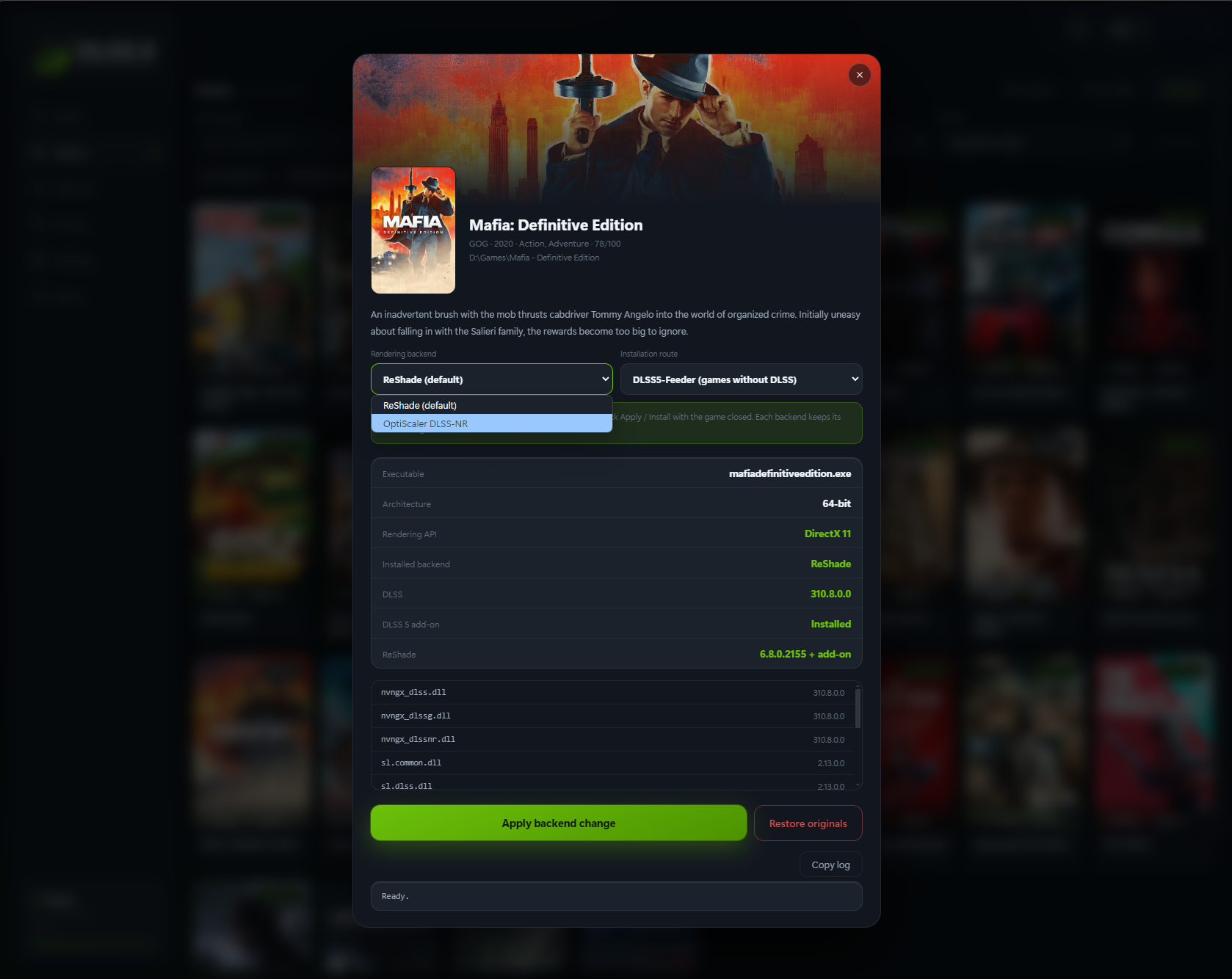
Swapper game detail — use the same app’s Restore flow that performed the install. Source: DLSS5-Swapper screenshots
Step 1 — Use the tool’s restore (preferred)
DLSS 5 Swapper
- Open Swapper → find the game card.
- Choose Restore originals (wording may be Restore / Uninstall on the card or right-click menu).
- Confirm the activity log shows backups restored.
- Launch once offline to verify.
DLSS 5 Manager
- Select the game → Uninstall / Restore.
- Confirm deploy log cleanup.
- If you enabled Live Flow / overlays, remove those toggles before relaunch.
Classic beeradmoore DLSS Swapper
- Select the game → restore the previous DLSS / FSR / XeSS DLL version from the app history.
- Prefer the app’s own restore over manual file hunting when history exists.
OptiScaler / Pre-SR manual install
- Run the fork’s uninstall / setup cleanup if present.
- Delete or rename proxy DLLs you added (
dxgi.dll,winmm.dll,d3d12.dll,fakenvapi.dll/nvapi64.dllfrom Fakenvapi, etc.) only if you know you added them. - Restore any renamed originals from your backup folder.
Step 2 — Manual backup restore
If you copied files before installing (you should):
| Typical files | Notes |
|---|---|
nvngx_dlss.dll, nvngx_dlssg.dll, nvngx_dlssd.dll |
Classic upscaler / FG / RR swaps |
nvngx_dlssnr.dll |
Neural Rendering model (do not grab random copies) |
dxgi.dll, winmm.dll, d3d12.dll, version.dll |
Common OptiScaler proxy names |
ReShade.ini, dxgi.ini, add-on folders |
Feeder / RenoDX stacks |
Copy backups back over the game folder. Prefer exact originals from this title’s backup, not another game’s DLLs.
Step 3 — Platform verify
| Platform | Action |
|---|---|
| Steam | Properties → Installed Files → Verify integrity of game files |
| Epic | Library → Manage → Verify |
| Xbox / Game Pass | Repair / Reset via the Xbox app when available |
| GOG | Verify / Repair in GOG Galaxy |
Verify often replaces stock game files but may leave third-party proxies that were never part of the manifest. After verify, re-check for unexpected dxgi.dll next to the exe.
Step 4 — Leftover injector sweep (careful)
Only delete files you recognize from the mod install:
- Sort the game exe folder by Date modified.
- Look for new
dxgi.dll/ ReShade / OptiScaler / Fakenvapi files dated to your install. - Remove those leftovers, then verify again if unsure.
- Do not delete GPU driver files under
C:\Windows\System32.
Prevention checklist
| Habit | Benefit |
|---|---|
| GitHub-only downloads | Avoid malware “repair” EXEs |
| One tool per game | Fewer conflicting proxies |
| Test restore on day one | Confirms backups exist |
| Restore before patches / online | Reduces AC and update breakage |
| Keep a zip of pre-mod folder | Manual undo when UI restore fails |
FAQ
Steam verify didn’t fix the crash
Leftover injectors often survive verify. Remove OptiScaler/ReShade proxies manually, then verify again.
Can I reinstall the mod after restore?
Yes — after a clean boot. Prefer updating the installer from GitHub first. See Apply paths.
Is deleting nvngx_dlss.dll safe?
Only if you are replacing it with the game’s verified original. Never leave the game without its expected DLSS files unless the title never shipped them.
Sources
- rakanki911/DLSS5-Swapper · dlss5swapper.org/guides
- beeradmoore/dlss-swapper
- optiscaler/OptiScaler wiki
- Terapep: Autopilot guide · Online/anti-cheat · GitHub vs fake
Screenshot: Swapper project UI (GitHub raw) — not NVIDIA promo art.
← Back to all posts